Facebook Business Page sizes
Make sure you fill in all the data and design the Facebook images for your business’s Facebook page. Facebook page which seems to be under construction will reflect poorly on your brand. The most important you need to get right is Facebook cover photo size. Facebook image size is important because if you get it wrong, then the images will become all blurry and do not reflect well on your brand.
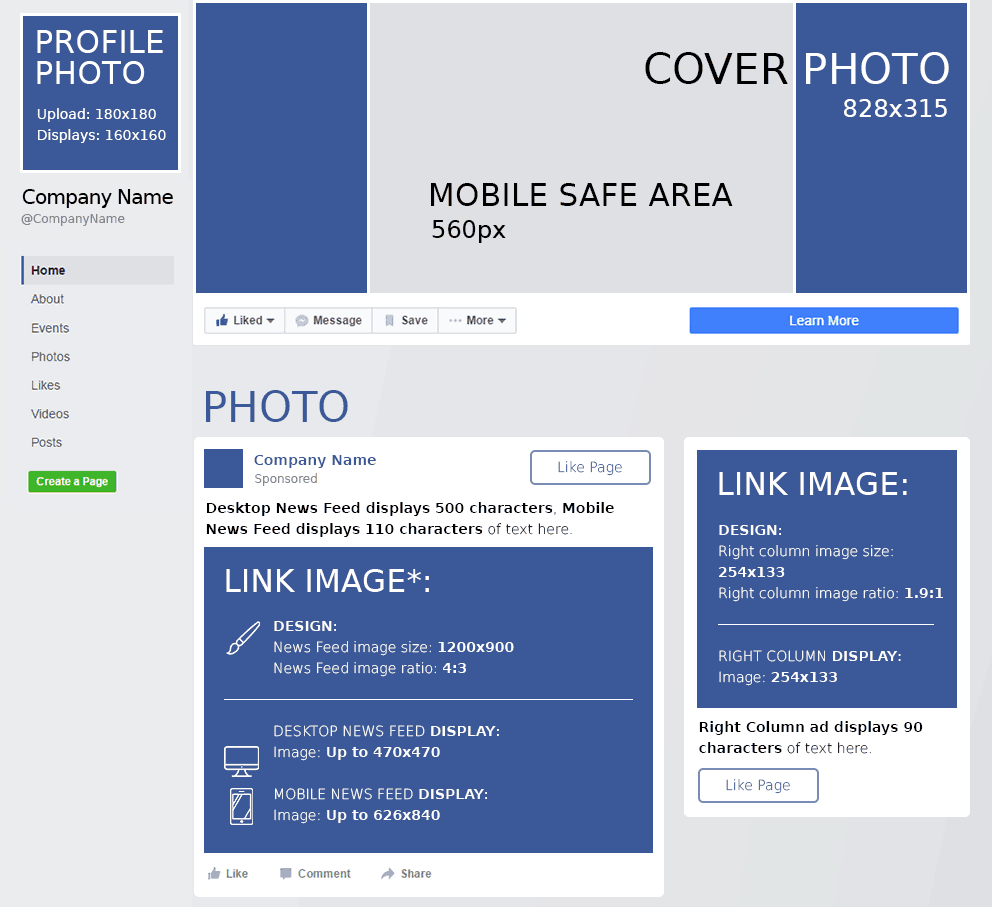
Profile photo: 180 x 180 pixels. Displays at 160 x 160 best results when uploading a square image (360×360, 720×720 or 960×960). Facebook profile picture frame size is 183×183 pixels.
Facebook cover photo size: 828 x 315 px (851x315px for personal profiles)
News Feed link image size: 1200 x 900 px
News Feed link image ratio: 4:3
Desktop news feed display: Up to 470 x 470 px
Mobile news feed display: Up to 626 x 840 px
Right column image size: 254 x 133 px
Text: Desktop news feed displays 500 characters, mobile 110 characters, right column ad 90 characters.
Facebook Ads & Marketing Mastery Guide 2018
 Use Facebook marketing to excel your business! Take this top rated course to optimize your Facebook ads today! Connect with new audiences and lower ad costs. Track Facebook ad conversions.
Learn $0.01 per engagement ad strategies. 4.5 rating out of 4,328 ratings with more than 32 thousand students enrolled. 7.5 hours on-demand video, articles, supplemental resources. Certificate of Completion.
Get full lifetime access!
Here are the templates you can use to create header graphics that will work for both desktop and mobile users. Click the images to download full sized versions.
Read next: Selection of Best Social Media Marketing Resources
This is the image that works best on desktop computers. It is displayed in full on desktop 828 by 315 pixels. On the mobile devices, Facebooks cuts the blue sides, and only the green part is visible (560 by 315 pixels)
This 828 by 461-pixel image is visible in full on mobile devices. Facebook cuts the green top and bottom on the desktop devices, and only the standard 828 by 315-pixel area is visible.
Facebook Video Size
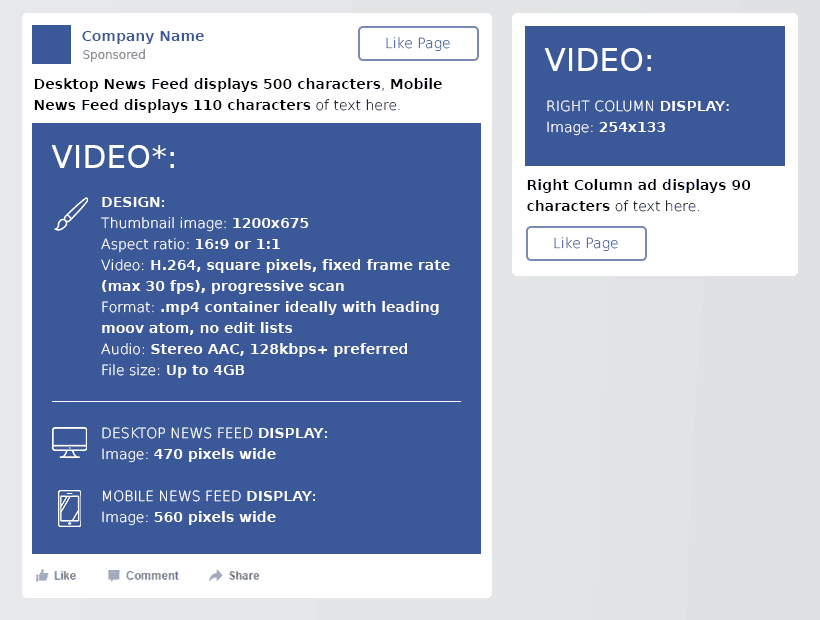
Thumbnail image: 1200 x 675 px
Aspect ratio: 16:9 or 1:1
Video: h.264, square pixels, fixed frame rate (max 30 fps), progressive scan
Format: .mp4 container ideally with leading moov atom, no edit lists
Audio: stereo aac, 128kbps+ preferred
File size: up to 4gb
Right column image display: 254 x 133 px
Text: Desktop news feed displays 500 characters, mobile 110 characters, right column ad 90 characters.
Social Media Marketing 2019, PPC on 10+ Platforms.
 Learn how to market via Twitter, Pinterest, Instagram, YouTube, Facebook, Google and more advertising platforms! This must-have course has a 4.5 rating out of 4,235 ratings with more than 37,000 students enrolled.
Facebook Carousel photos
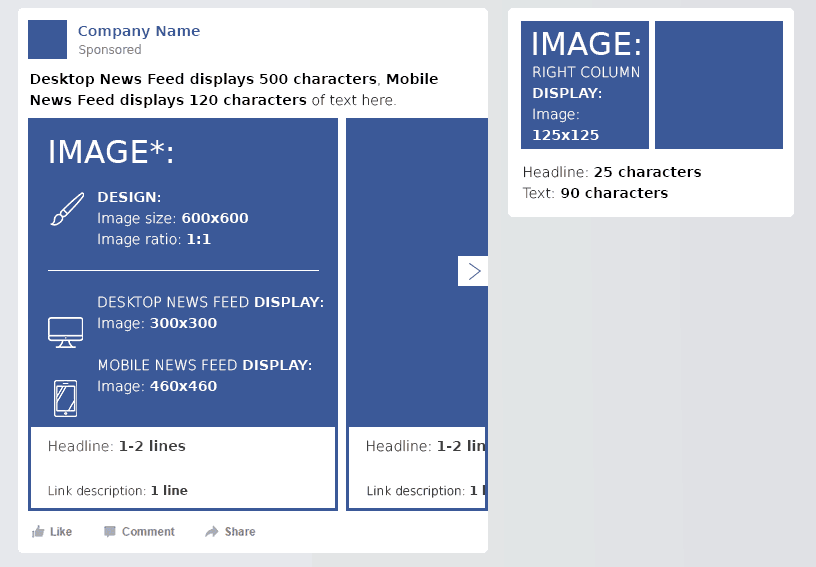
Image size: 600 x 600 px
Image ratio: 1:1
Desktop news feed display: 300 x 300 px
Mobile news feed display: 460 x 460 px
Right column image display: 125 x 125 px
Text: Desktop news feed displays 500 characters, mobile 120 characters, right column ad 90 characters.
Facebook Apps images
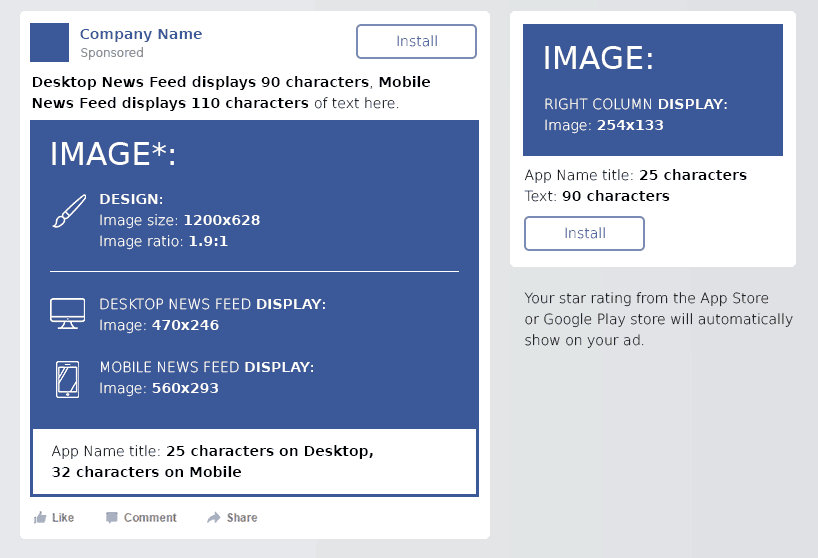
Image size: 1200 x 628 px
Image ratio: 1.9:1
Desktop news feed display: 470 x 246 px
Mobile news feed display: 560 x 293 px
Right column display: 254 x 133 px
Text: Desktop news feed displays 90 characters, mobile 110 characters, right column ad 90 characters.
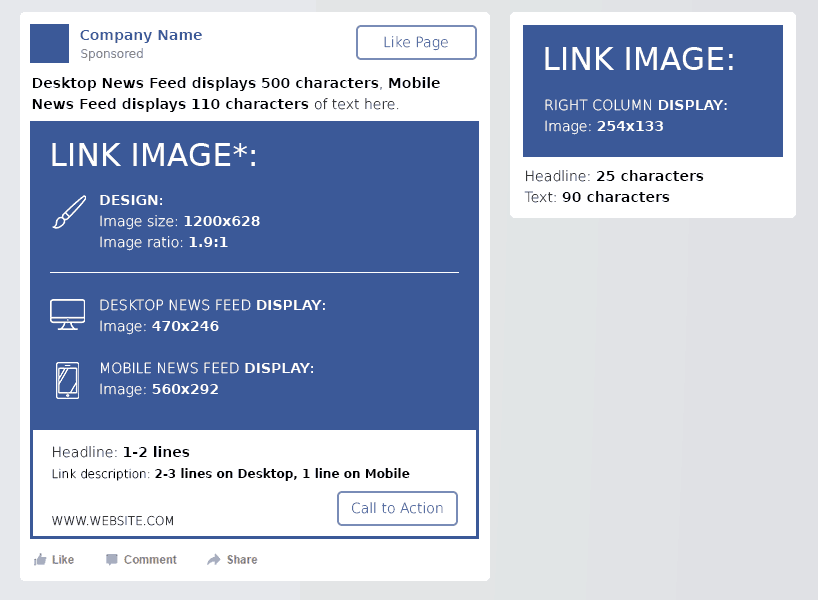
Clicks to Website
Image size: 1200 x 628 px
Image ratio: 1.9:1
Desktop news feed display: 470 x 246 px
Mobile news feed display: 560 x 292 px
Right column display: 254 x 133 px
Text: Desktop news feed displays 500 characters, mobile 110 characters, right column ad 90 characters.
Facebook Group Cover Photo Size
The Facebook Group cover image is for some reason different from the Facebook Page cover photo size. The Facebook Group photo is 820 pixels wide by 462 pixels tall. The visible size on the desktop is 820 by 250 pixels.
Image size: The size for group photos is 820 by 462 pixels (fully visible on mobile)
Desktop news feed display: 820 x 250 px (top and bottom cut)
Facebook Event Image Sizes
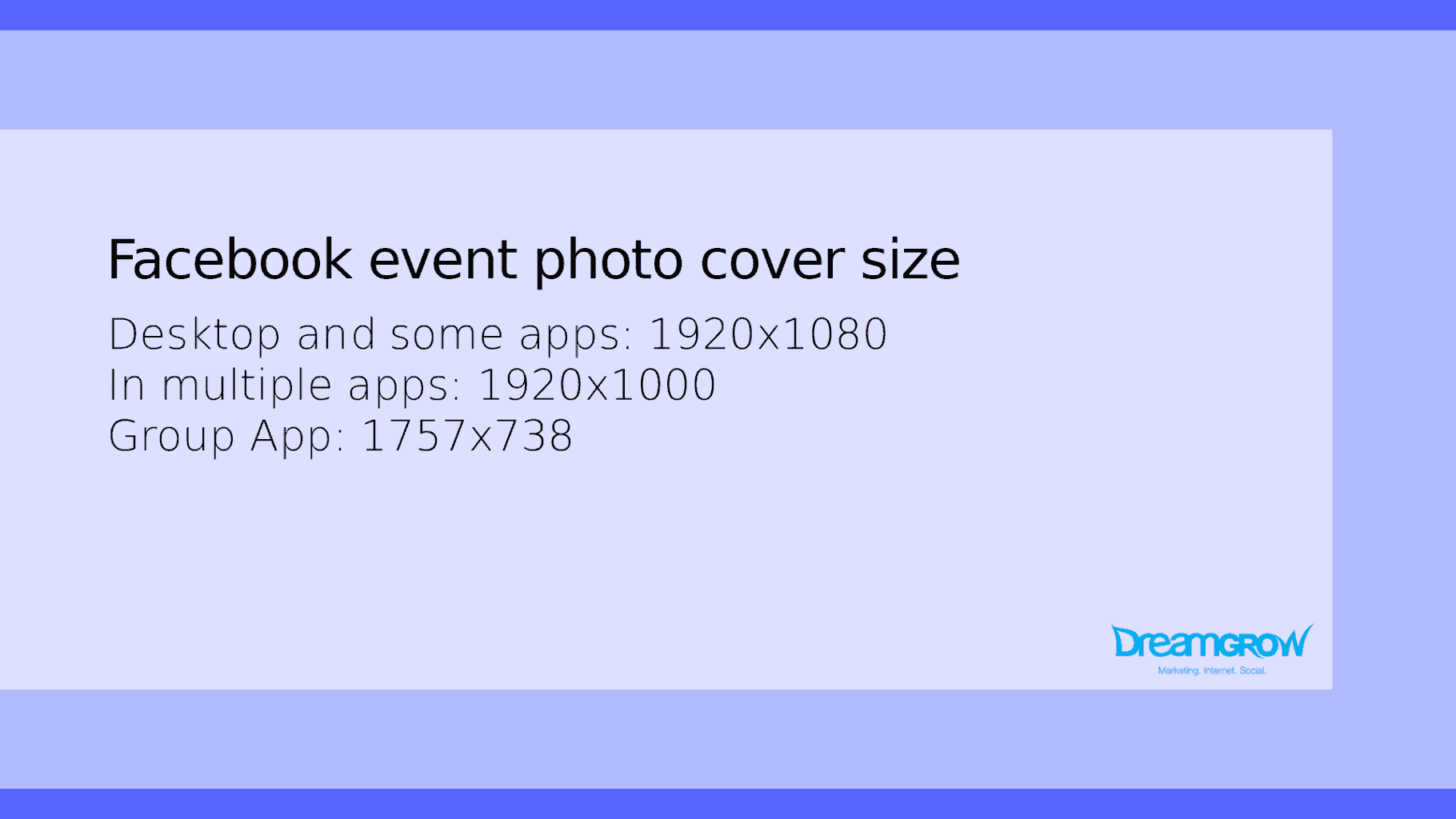
Facebook event photo size is different in various locations. The correct Facebook event cover photo size is 1920 x 1080 pixels a 16:9 ratio. Wider images will have the sides cropped. Taller images will be cropped top and bottom. There are online Facebook event photo maker tools, but it’s really easy to resize image for Facebook event yourself.
Image size: The
recommended size for event photos is 1920 by 1080 pixels (16:9 ratio)
Desktop news feed display: 470 x 174 px
Mobile news feed display: 560 x 208 px
Right column display: 254 x 133 px
Text: Desktop news feed displays 500 characters, mobile 110 characters, right column ad 90 characters.
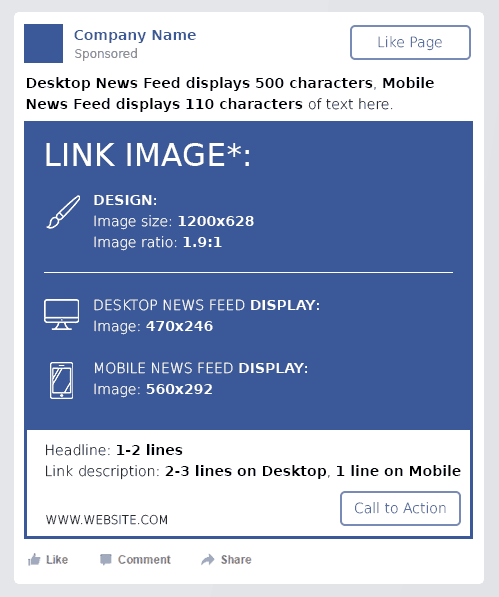
Lead Generation
Image size: 1200 x 628 px
Image ratio: 1.9:1
Desktop news feed display: 470 x 246 px
Mobile news feed display: 560 x 292 px
Text: Desktop news feed displays 500 characters, mobile 110 characters.
Facebook Offers
Image size: 1200 x 628 px
Image ratio: 1.9:1
Desktop news feed display: 470 x 246 px
Mobile news feed display: 560 x 292 px
Right column display: 254 x 133 px
Text: Desktop and mobile news feeds display 90 characters.
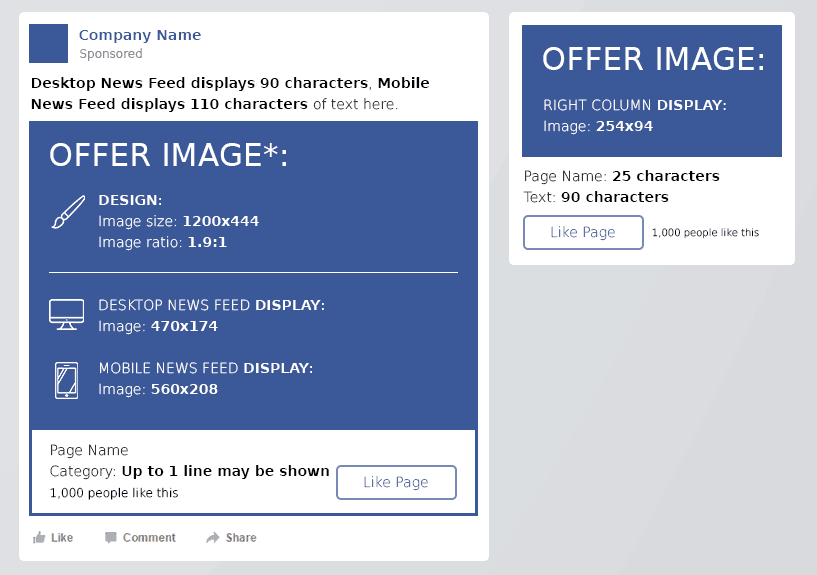
Facebook Page Likes
Image size: 1200 x 444 px
Image ratio: 1.9:1
Desktop news feed display: 470 x 174 px
Mobile news feed display: 560 x 208 px
Right column display: 254 x 94 px
Text: Desktop news feed displays 500 characters, mobile 110 characters, right column ad 90 characters.
Facebook Text
Maximum allowed characters: 500
Good length to aim for: 150 characters or less.
You can find and download the full infographic here!
Did we miss something? New changes? Let us know in the comments.